


Cocobi Life World - city, town
3.9128.00 Reviews
App Specs
- Version
- 1.1.6
- Updated On
- License
- Free
- Downloads
- 10,000,000+
- Developer
- KIGLE
- Categories
- Educational
- Platform
- Android, iOS
Screenshots



 Analysis by AppCompare
I would approach Cocobi Life World - city, town as a little world to visit together, not as a demanding city-management challenge. It is an educational game from KIGLE, aimed at children, where the appeal is in exploring a playful setting and deciding what to do next. The first useful question is whether your child enjoys making up stories as they play. If they do, this kind of open-ended setting has more to offer than a game built around winning a level and moving on.
Starting with a small choice
The easiest way into a game like this is to let the child choose one thing to focus on rather than asking them to make an entire town at once. They might pick a place to visit, a character to follow, or an idea for a short pretend-play scene. That small starting point turns a broad, colorful world into a manageable activity. I would sit nearby at first, not to direct every move, but to ask what they want to happen and let them steer.
That approach is especially useful for a younger player who can be excited by lots of things on screen but unsure what to do first. Instead of treating the game as a set of objectives, I would frame it as a story prompt: where is everyone going, what might happen there, and what should the child try next? The value is in the decisions and imaginative narration, not in assuming the game teaches a formal lesson or follows a fixed curriculum.
Where the play loop works—and where it can stall
The satisfying rhythm here is simple: take an action in the world, see how the scene responds, enjoy the result, and then choose another action. That immediate feedback makes experimentation approachable for children. They can try an idea, notice what changes, and carry on without needing to master complicated controls. In my view, the best sessions come from allowing a little aimless exploration before suggesting a fresh scenario.
The trade-off is that open-ended play can feel vague to a child who expects clear instructions, a score, or a sequence of increasingly difficult challenges. A parent can help by offering a limited choice—“shall we explore this place or make up a story here?”—without turning the session into a lesson. If your child prefers puzzles with definite answers or games that clearly explain each goal, a more structured educational title may suit them better.
Making a short visit feel complete
A practical way to use Cocobi Life World is as a brief, shared activity during a quiet stretch of the day. For example, after coming home, a child could choose a place in the game and invent a small event around it while you make dinner nearby. Agree on a stopping point before play begins, such as finishing the pretend story or wrapping up one chosen activity. That gives the session a natural ending instead of relying on the child to decide when to put the device away.
This is also a good moment to talk through choices: what did the child try, what happened, and what would they do differently next time? That kind of conversation can make creative play more engaging, though I would keep it light. The game is entertainment first; it should not have to carry the full burden of teaching, and an adult’s occasional participation can add warmth without taking control away from the child.
Worth Reading Before You Choose

Flipboard Shows What News Apps Must Do Beyond the Feed

Switching to Android Auto Means Rethinking Your Driving Routine

Google Calendar Makes a Crowded Week Easier to Manage

Ludo King Makes the Most of the Minutes Between Plans

Baby Panda World Brings Quick Play to Modern Phones, but Its Game Library Feels Busy

ESPN’s Live Game View Makes Following Close Games Easier
The game is free to start, with optional in-app purchases listed at around two to three dollars per item. I would check the purchase settings on the device before handing it to a child, and make clear that exploring does not mean every extra item is automatically available. That small bit of preparation avoids turning a relaxed play session into a negotiation about spending. It also helps families decide whether the free experience is enough for their needs before considering an optional purchase.
Who is likely to enjoy it?
This is best suited to children who like colorful pretend worlds, character-led play, and making their own small stories. It may also work well for a caregiver looking for something to explore together rather than a game that occupies a child through a tightly guided sequence. The Everyone age rating makes it broadly accessible, but an age label is not a substitute for an adult deciding whether the style and level of interaction fit a particular child.
Families should also consider what kind of educational play they want. A dedicated spelling, number, or logic game is a better match when the goal is repeated practice with a clear skill and measurable progress. A traditional town-building game may be preferable for someone who wants deeper planning and resource decisions. This title sits closer to imaginative role-play: its strongest use is giving a child a setting for exploration, not replacing a focused learning tool or a more complex builder.
What to know before installing
It has an average rating of 4.1 from around 7,800 ratings, and more than 10 million installs. Those figures suggest that it has found a broad audience, though they do not tell me whether its open-ended style will click with a particular child. The current version is 1.1.6, and the game was released on October 24, 2023. It requires Android 7.1 or later, so I would check device compatibility before planning a download.
Because the audience includes young children, I would set up the device first: check purchase controls, decide whether play should be supervised, and agree on a stopping routine. Those steps are useful with any child-focused mobile game, but they matter especially when a child can move freely between playful activities and may not naturally stop after one more idea. The game is free, yet the optional purchases make a quick settings check worthwhile.
The World is Your Playground
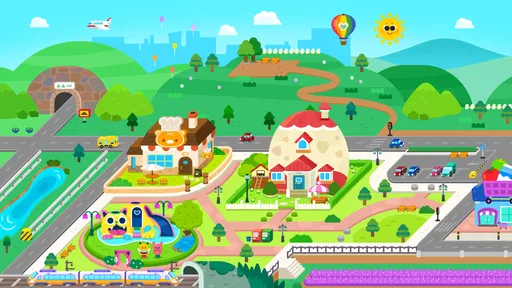
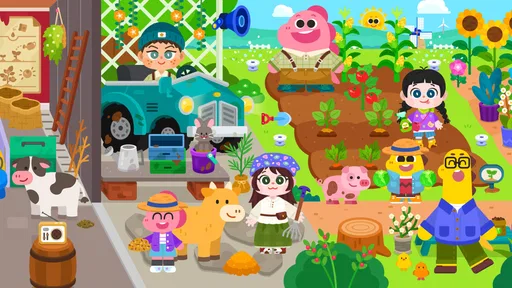
Imagine a world where there are no limits to what you can create. That's exactly what Cocobi Life World offers. As soon as you fire up the app, you're greeted with a vibrant and interactive environment that feels like a sandbox come to life. The graphics are charmingly cartoonish, inviting players of all ages to immerse themselves in the game.
The app lets you build and customize your own unique city, town, or even a bustling metropolis. You can place buildings, streets, parks, and more, customizing the landscape to your heart's desire. Whether you're aiming for a cozy village vibe or a sprawling urban area, the tools at your disposal make it all possible.
Interactive Adventures Await
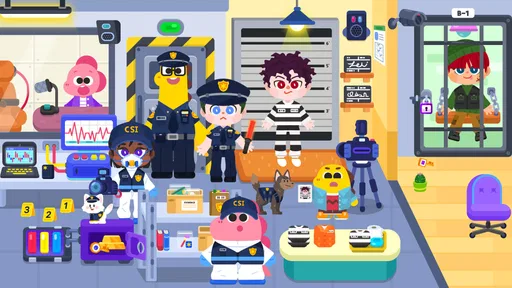
Beyond just building, Cocobi Life World is packed with interactive elements that make the game truly engaging. Each character you encounter has a personality, and you can interact with them in numerous ways. From helping a shopkeeper with their daily tasks to organizing a festival in the town square, the possibilities are endless.
These interactive adventures are not just fun but also educational. They encourage players to think creatively and solve problems, all while exploring the intricacies of their virtual world. It's a delightful mix of fun and learning that keeps you coming back for more.
Customization is Key
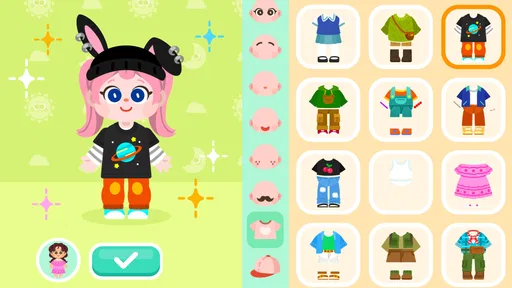
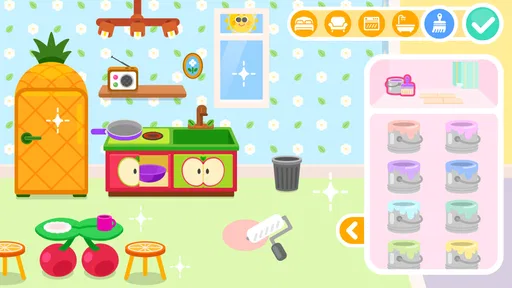
One of the standout features of Cocobi Life World - city, town is its extensive customization options. You can tailor nearly every aspect of your world, from the appearance of buildings to the outfits of your characters. This level of personalization ensures that no two worlds are ever the same. It’s all about expressing your creativity and making the game truly yours.
Moreover, the app frequently updates with new content, ensuring that there's always something fresh to explore and customize. You’ll never run out of ideas or inspiration.
User-Friendly and Intuitive
The developers of Cocobi Life World have clearly put a lot of thought into creating an app that’s easy to navigate. The interface is intuitive, making it accessible for players of all ages. Even if you're new to mobile games, you'll find it easy to jump right in and start creating your world without a steep learning curve.
Every element is designed to be user-friendly, which means more time spent enjoying the game and less time figuring out how to play it. This is a huge plus, especially for younger players or those who might be less tech-savvy.
Endless Possibilities
In Cocobi Life World - city, town, the only limit is your imagination. The app encourages you to explore, experiment, and engage with every aspect of your world. Whether you're a fan of city-builders or interactive adventures, this app has something for everyone.
As you continue to play, you'll discover new features and unlock even more possibilities. The game grows with you, adapting to your play style and keeping you entertained for hours on end.
If you're looking for a mobile game that offers creativity, interaction, and endless fun, Cocobi Life World - city, town is definitely worth a download. Dive in and start building your world today – who knows what adventures await?
Pros
- Rich
- interactive environments to explore.
- Customizable characters and settings.
- Frequent updates with new content.
- Offline play available for convenience.
- Engaging mini-games enhance gameplay.
Cons
- Some features require in-app purchases.
- Occasional glitches in crowded scenes.
- Loading times can be sluggish.
- Limited parental controls for purchases.
- May consume significant device storage.
FAQs for Cocobi Life World - city, town
What is Cocobi Life World - city, town about?
Cocobi Life World - city, town is an immersive simulation game that allows players to create and manage their own virtual city or town. Players can build houses, shops, and various facilities while interacting with residents. The game offers a rich experience with customizable options and endless scenarios, making it perfect for players who enjoy creativity and strategy.
Is Cocobi Life World suitable for children?
Yes, Cocobi Life World is designed with family-friendly content and is suitable for children. The game encourages creativity, problem-solving, and strategic thinking. It features colorful graphics and engaging tasks that are appropriate for younger audiences. However, parents may want to supervise to ensure in-game purchases are managed appropriately.
Does Cocobi Life World require an internet connection?
Cocobi Life World can be enjoyed offline, allowing players to build and explore their city at any time. However, a stable internet connection is needed for certain features, such as downloading new content, accessing updates, and connecting with friends. This flexibility makes it convenient for both online and offline play.
Are there in-app purchases in Cocobi Life World?
Yes, Cocobi Life World includes in-app purchases that allow players to enhance their gaming experience. These purchases can unlock special items, characters, and additional content. While the game is free to download, players should be aware of these optional purchases, especially when allowing children to play.
How often does Cocobi Life World receive updates?
Cocobi Life World is regularly updated to ensure a fresh and exciting experience for players. Updates often include new features, bug fixes, and additional content such as new buildings or characters. It's recommended to enable automatic updates to enjoy the latest enhancements and maintain smooth gameplay.


